Not advertising yet?
Google Ads for small business, set up for you
WarmClicks reads your website (what you offer, where you work and when you're open), decides which campaign types fit your kind of business and in which order, and writes your first campaign: the keywords, the ads, the budget and every setting. You import it into Google Ads in one file. Included in the free trial, opening soon.
- The right campaign types, in order
- One ad group per service
- Headlines and descriptions written
- Budget and bid limit set
- Negative keywords included
Example for a made-up dental clinic in Denver. The numbers are invented; the plan is built exactly like yours.
Your first campaign
Campaign in this file
Search
People search for the treatment or service and a place, then book. Search shows your ad exactly then, and you only pay for clicks.
Name: Northside Dental – Search Denver · 6 ad groups · 31 keywords · 19 negative keywords
Daily budget
$60 a day
At most $1,824 a month, 10 clicks a day.
Bid limit: $12 per click
Your campaign plan
Which campaigns, in which order
- 1
Search
Now: the file below · 100% of the budget at the start
People search for the treatment or service and a place, then book.
- 2
Display remarketing
After 1,000 website visitors a month · 10% of the budget, moved from the campaigns above
Shows your ad again to people who visited but didn't book. Below 1,000 visitors a month the list is too small to be worth it.
- 3
Performance Max
After 30 bookings a month from ads · 20% of the budget, moved from Search, as a test
With 30 real bookings a month Google can learn who books. Below that it has too little to learn from.
Not for you, and why
Display (to new people)
Display ads show on websites and apps to people who aren't searching for you. Clicks are cheap, but these people weren't looking for you. A new account starts with people who search.
Shopping
Shopping ads are for physical products sold online. You sell appointments.
Every setting, decided
Campaign settings
- Business typeAppointment business (people book a visit)Read from your website. It decides the goal, the hours and the ad wording below.
- GoalBookingsTells Google what counts as a new customer for you.
- What to countCompleted online bookings (the confirmation page), plus calls from ads lasting 60 seconds or longerOnly real customers: page views and short calls teach Google the wrong thing.
- NetworksGoogle Search onlySearch partners and the Display Network show your ad on other sites and apps. A new campaign starts on Google Search only, so every click comes from someone searching.
- LocationsDenver, Aurora, Lakewood, EnglewoodOnly where you can serve customers.
- Location optionPresence: people in or regularly in your locationsGoogle's default also shows ads to people who are only interested in the area, from anywhere.
- LanguagesEnglishThe language of your website.
- Ad scheduleAll hours, every dayPeople book online at any time, also in the evening. The call button still shows only while someone can answer.
- BiddingMaximize clicks, with a limit of $12 per clickTwice Google's lower top-of-page price per click: your ads can show at the top for these searches, without paying for the most expensive spots. A new account has no conversions yet, so automatic bidding can't learn; clicks come first.
- Daily budget$60 a day ($1,824 a month at most)10 clicks a day at $6 a click, the low end of Google's top-of-page price for these searches. Fewer clicks than that, and after a month you can't tell what works.
- Call asset(303) 555-0123Shows a call button with your number under the ad, only during your opening hours. Google doesn't allow phone numbers inside the ad text.
- Auto-apply recommendationsOffNothing in your account changes without you.
- AI Max and final URL expansionOffYour ads keep going to the page you chose for each service.
- When to switch biddingAfter 15 bookings from ads in a month: Maximize conversionsThen Google has enough real bookings to learn from.
Ad groups, keywords and ads
How to type them in Google Ads: exactly as shown, with the brackets and quotes
- [emergency plumber denver] with brackets = exact match: your ad shows for that search or one with the same meaning.
- "emergency plumber" in quotes = phrase match: the search has to contain that meaning, with other words around it ("emergency plumber open now").
- No brackets, no quotes = broad match: Google also shows your ad for related searches. WarmClicks doesn't use it for your keywords, because it spends on loose matches before Google knows which searches bring customers.
- Negative keywords: a plain word (jobs) blocks every search that contains it; brackets ([vet manchester]) block only that exact search.
Teeth whitening
→ northside-dental.example/teeth-whiteningKeywords
- "teeth whitening denver"590 searches a month$4–$13 a click
- "teeth whitening near me"
- [teeth whitening denver]
Your ad on Google
Sponsored
northside-dental.example › teeth-whitening
Teeth Whitening in Denver – Northside Dental – Book Online Today
Teeth whitening in Denver from Northside Dental. Book online in a minute.
All 15 headlines and 4 descriptions
- Teeth Whitening in Denver
- Northside Dental
- Book Online Today
- Denver Teeth Whitening
- Teeth Whitening Near You
- Rated 4.8 by 214+ Customers
- 214+ Reviews on Google
- Open Saturdays
- Serving Denver and Nearby
- Also Serving Aurora
- Also Serving Lakewood
- Professional Teeth Whitening
- Teeth Whitening You Can Trust
- Questions? Talk to Us
- Visit northside-dental.example
- Teeth whitening in Denver from Northside Dental. Book online in a minute.
- Rated 4.8 by 214+ customers on Google. Book online in a minute.
- Open on Saturdays too, so you don't have to take time off. Book online in a minute.
- Not sure what you need? Talk to our team before you decide. Book online in a minute.
Dental implants
→ northside-dental.example/dental-implantsKeywords
- "dental implants denver"1,300 searches a month$11–$39 a click
- "dental implants near me"
- [dental implants denver]
Your ad on Google
Sponsored
northside-dental.example › dental-implants
Dental Implants in Denver – Northside Dental – Book Online Today
Dental implants in Denver from Northside Dental. Book online in a minute.
All 15 headlines and 4 descriptions
- Dental Implants in Denver
- Northside Dental
- Book Online Today
- Denver Dental Implants
- Dental Implants Near You
- Rated 4.8 by 214+ Customers
- 214+ Reviews on Google
- Open Saturdays
- Serving Denver and Nearby
- Also Serving Aurora
- Also Serving Lakewood
- Professional Dental Implants
- Dental Implants You Can Trust
- Questions? Talk to Us
- Visit northside-dental.example
- Dental implants in Denver from Northside Dental. Book online in a minute.
- Rated 4.8 by 214+ customers on Google. Book online in a minute.
- Open on Saturdays too, so you don't have to take time off. Book online in a minute.
- Not sure what you need? Talk to our team before you decide. Book online in a minute.
Invisalign
→ northside-dental.example/invisalignKeywords
- "invisalign denver"480 searches a month$6–$17 a click
- "invisalign near me"
- [invisalign denver]
- "clear aligners denver"
- "clear aligners near me"
- [clear aligners denver]
Your ad on Google
Sponsored
northside-dental.example › invisalign
Invisalign in Denver – Northside Dental – Book Online Today
Invisalign in Denver from Northside Dental. Book online in a minute.
All 15 headlines and 4 descriptions
- Invisalign in Denver
- Northside Dental
- Book Online Today
- Denver Invisalign
- Invisalign Near You
- Rated 4.8 by 214+ Customers
- 214+ Reviews on Google
- Open Saturdays
- Serving Denver and Nearby
- Also Serving Aurora
- Also Serving Lakewood
- Professional Invisalign
- Invisalign You Can Trust
- Questions? Talk to Us
- Visit northside-dental.example
- Invisalign in Denver from Northside Dental. Book online in a minute.
- Rated 4.8 by 214+ customers on Google. Book online in a minute.
- Open on Saturdays too, so you don't have to take time off. Book online in a minute.
- Not sure what you need? Talk to our team before you decide. Book online in a minute.
Emergency dentist
→ northside-dental.example/emergency-dentistKeywords
- "emergency dentist denver"880 searches a month$6–$19 a click
- "emergency dentist near me"720 searches a month$7–$21 a click
- [emergency dentist denver]
Your ad on Google
Sponsored
northside-dental.example › emergency
Emergency Dentist in Denver – Northside Dental – Book Online Today
Emergency dentist in Denver from Northside Dental. Book online in a minute.
All 14 headlines and 4 descriptions
- Emergency Dentist in Denver
- Northside Dental
- Book Online Today
- Denver Emergency Dentist
- Emergency Dentist Near You
- Rated 4.8 by 214+ Customers
- 214+ Reviews on Google
- Open Saturdays
- Serving Denver and Nearby
- Also Serving Aurora
- Also Serving Lakewood
- Professional Emergency Dentist
- Questions? Talk to Us
- Visit northside-dental.example
- Emergency dentist in Denver from Northside Dental. Book online in a minute.
- Rated 4.8 by 214+ customers on Google. Book online in a minute.
- Open on Saturdays too, so you don't have to take time off. Book online in a minute.
- Not sure what you need? Talk to our team before you decide. Book online in a minute.
Veneers
→ northside-dental.example/veneersKeywords
- "veneers denver"390 searches a month$6–$20 a click
- "porcelain veneers cost"170 searches a month$3–$10 a click
- "veneers near me"
- [veneers denver]
- "porcelain veneers denver"
- "porcelain veneers near me"
- [porcelain veneers denver]
Your ad on Google
Sponsored
northside-dental.example › veneers
Veneers in Denver – Northside Dental – Book Online Today
Veneers in Denver from Northside Dental. Book online in a minute.
All 15 headlines and 4 descriptions
- Veneers in Denver
- Northside Dental
- Book Online Today
- Denver Veneers
- Veneers Near You
- Rated 4.8 by 214+ Customers
- 214+ Reviews on Google
- Open Saturdays
- Serving Denver and Nearby
- Also Serving Aurora
- Also Serving Lakewood
- Professional Veneers
- Veneers You Can Trust
- Questions? Talk to Us
- Visit northside-dental.example
- Veneers in Denver from Northside Dental. Book online in a minute.
- Rated 4.8 by 214+ customers on Google. Book online in a minute.
- Open on Saturdays too, so you don't have to take time off. Book online in a minute.
- Not sure what you need? Talk to our team before you decide. Book online in a minute.
Children's dentistry
→ northside-dental.exampleKeywords
- "kids dentist denver"320 searches a month$3–$10 a click
- "children's dentistry denver"
- "children's dentistry near me"
- [children's dentistry denver]
- "children dentist denver"
- "children dentist near me"
- [children dentist denver]
- "kids dentist near me"
- [kids dentist denver]
Your ad on Google
Sponsored
northside-dental.example › childrens
Children's Dentistry in Denver – Northside Dental – Book Online Today
Children's dentistry in Denver from Northside Dental. Book online in a minute.
All 13 headlines and 4 descriptions
- Children's Dentistry in Denver
- Northside Dental
- Book Online Today
- Denver Children's Dentistry
- Children's Dentistry Near You
- Rated 4.8 by 214+ Customers
- 214+ Reviews on Google
- Open Saturdays
- Serving Denver and Nearby
- Also Serving Aurora
- Also Serving Lakewood
- Questions? Talk to Us
- Visit northside-dental.example
- Children's dentistry in Denver from Northside Dental. Book online in a minute.
- Rated 4.8 by 214+ customers on Google. Book online in a minute.
- Open on Saturdays too, so you don't have to take time off. Book online in a minute.
- Not sure what you need? Talk to our team before you decide. Book online in a minute.
Never pay for these
Negative keywords
Searches like these never become customers, so your ads won't show for them.
- jobs
- job
- careers
- salary
- hiring
- internship
- training
- course
- courses
- school
- degree
- certification
- diy
- how to
- youtube
- wikipedia
- definition
- meaning
Extras under your ad
Sitelinks and callouts
- Teeth WhiteningTeeth Whitening in Denver · Book online in a minute
- Dental ImplantsDental Implants in Denver · Book online in a minute
- InvisalignInvisalign in Denver · Book online in a minute
- Emergency DentistEmergency Dentist in Denver · Book online in a minute
Same-Day Service · Open Saturdays · Book Online · 214+ Google Reviews · Local to Denver · Call Us Directly
Set it up
6 steps
How to upload it: every click in pictures
Every click in pictures
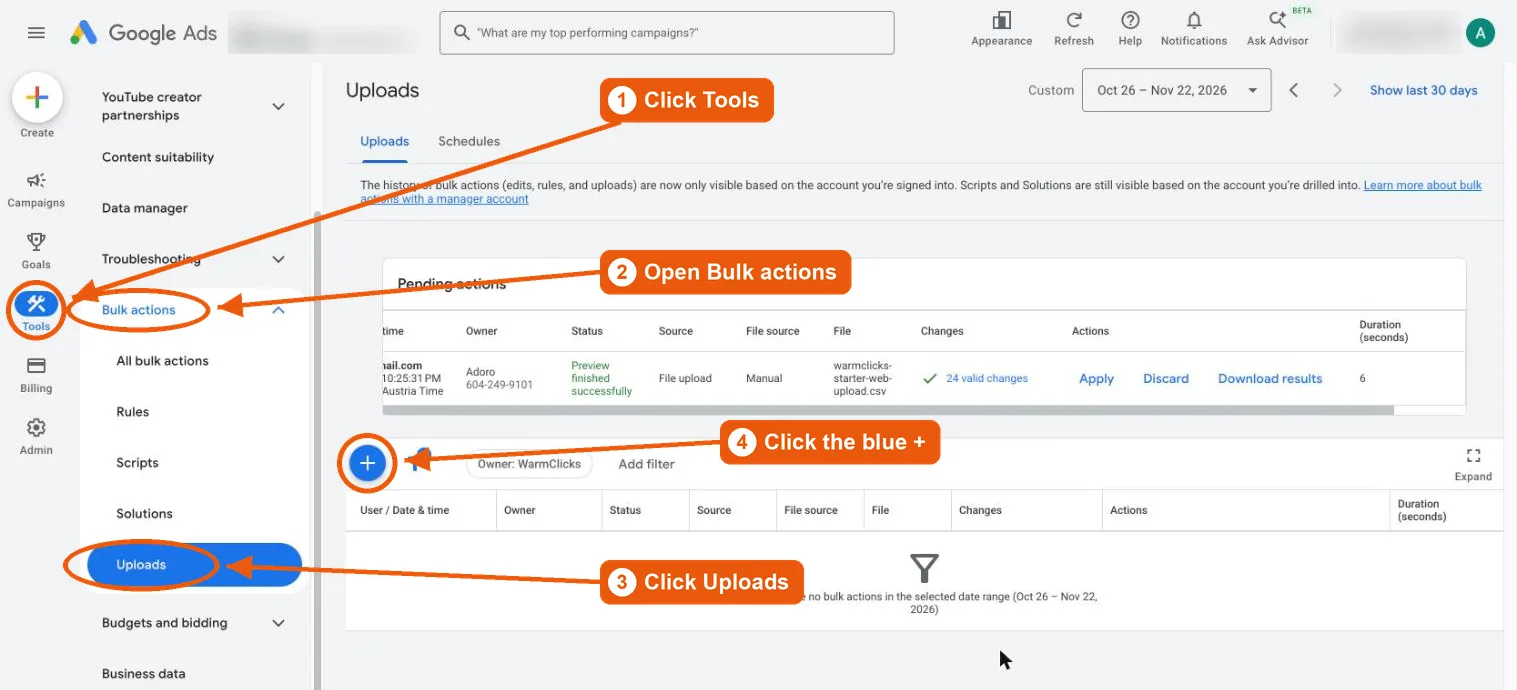
1–4Open ads.google.com. Click Tools in the bar on the left (1), open Bulk actions (2), click Uploads (3), then the blue + (4).
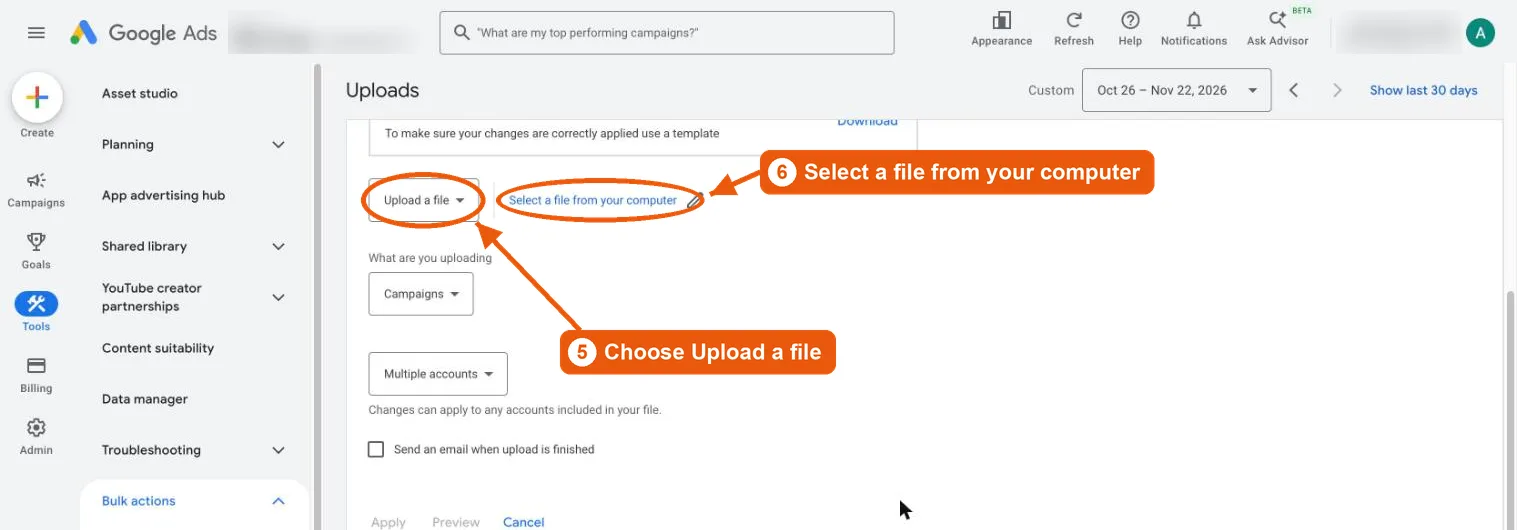
5–6Choose Upload a file (5), click Select a file from your computer and pick the file from WarmClicks (6). Leave “What are you uploading” on Campaigns.
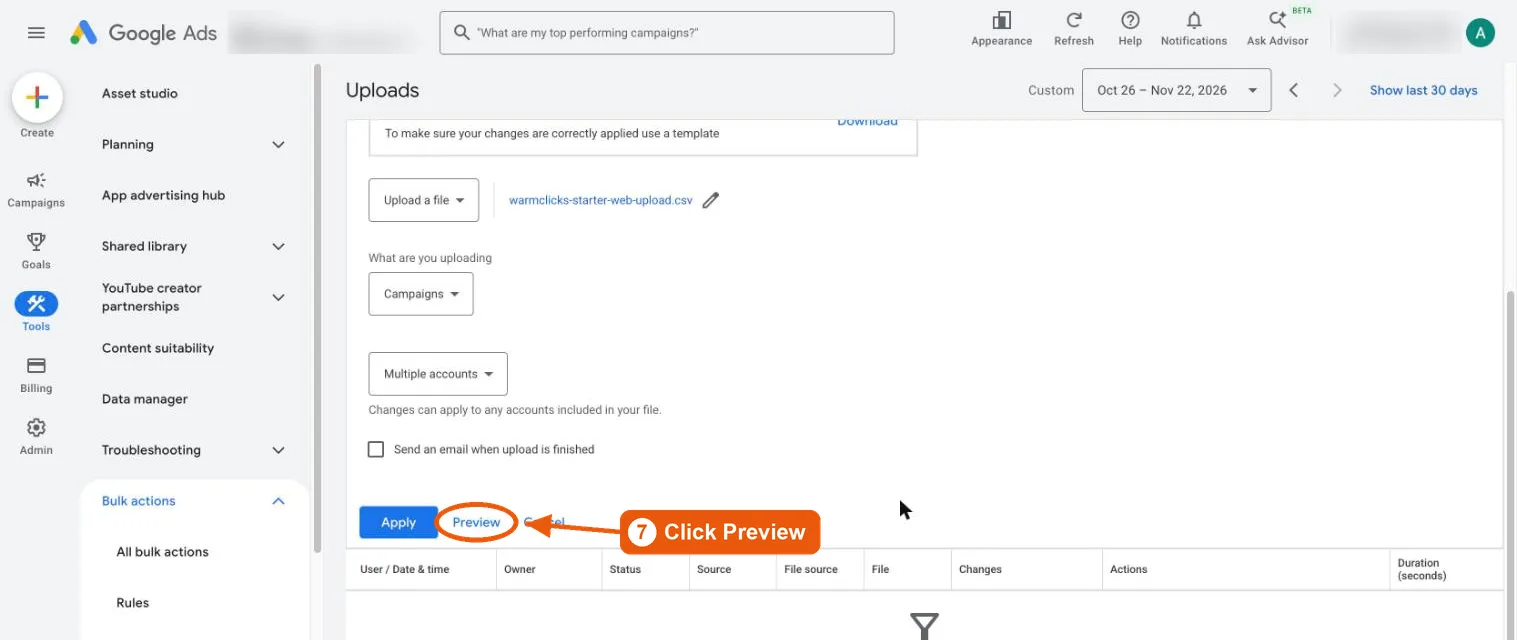
7Click Preview. Google checks every row first; nothing changes in your account yet.
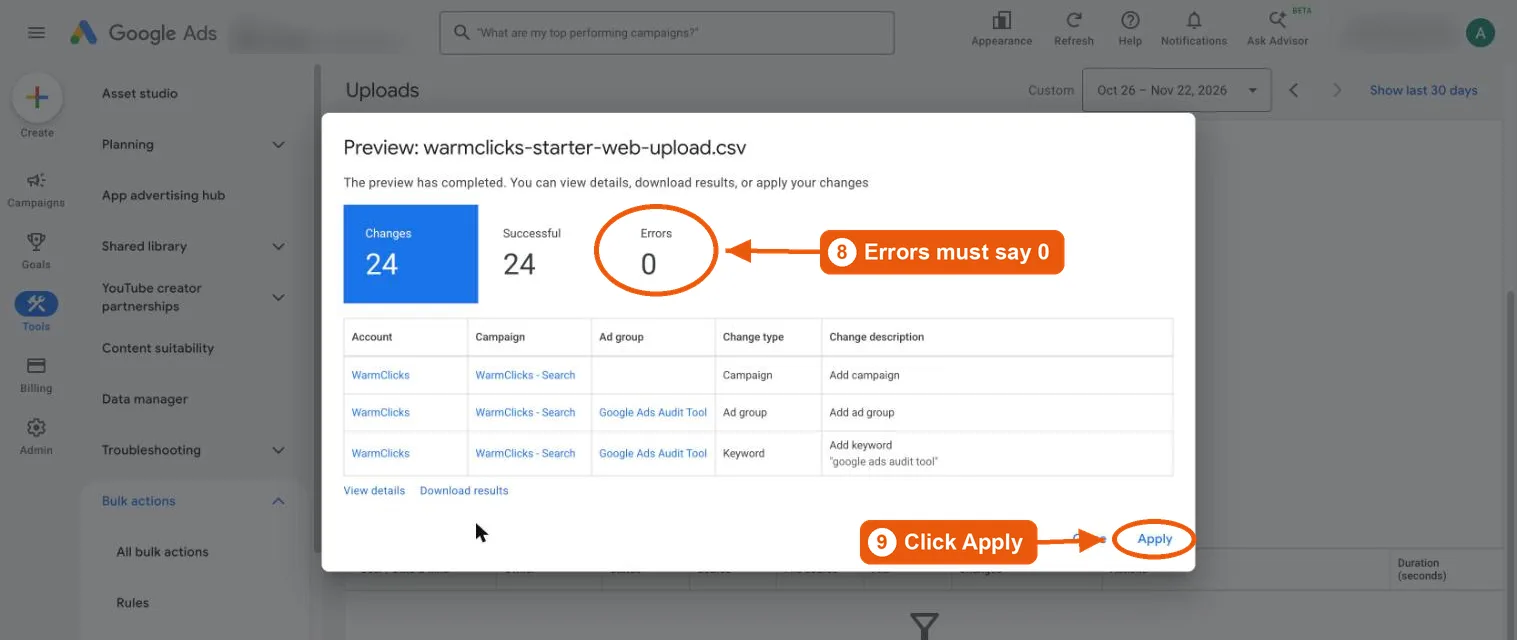
8–9Errors must say 0 (8). Then click Apply (9). A new campaign arrives paused, so nothing is spent until you switch it on.
The file holds your Google Ads customer ID, so it only changes the account it was made for.
Google's upload has no column for the ad schedule or the bid limit: set those by hand afterwards (our ad schedule guide shows how).
Errors above 0? Click “Download results”: Google writes the reason next to each row. Send it to connect@warmclicks.com and we fix the file.
The file contains the example clinic's campaign, so you can see what it looks like.
- 1Create your Google Ads accountGo to ads.google.com and sign in. When Google offers to build a campaign for you, choose "Switch to Expert Mode", then "Create an account without a campaign". Choose your country, time zone and currency (USD) carefully: they can't be changed later.
- 2Add paymentBilling › Settings. Nothing is spent until your campaign is switched on.
- 3Upload your campaign (no software needed)In Google Ads: Tools › Bulk actions › Uploads › + › Upload a file, choose the WarmClicks file, click Preview, check that Errors says 0, then Apply. Your campaign arrives paused, with every ad group, keyword, ad and negative keyword. Picture guide: warmclicks.com/guide/upload-campaign.
- 4Set your area, hours and bid limitSelect the campaign › Locations: Denver, Aurora, Lakewood, Englewood, with "Presence". Ad schedule: all hours, every day. Bidding: Maximize clicks with a maximum cost per click of $12.
- 5Count your customersGoals › Conversions › New conversion action. Count: completed online bookings (the confirmation page), plus calls from ads lasting 60 seconds or longer. Without this, Google can't learn which clicks bring customers.
- 6Switch it on, and connect it to WarmClicks right awayEnable the campaign and invite WarmClicks read-only the same day. We read it every day, warn you the same day if something costs money, and send new recommendations every day in the first week, every 2 days until week 3, then once a week.